 Downsmith
Free · Works offline
Shape your Markdown. Downsmith is a Markdown editor for macOS and Linux.
Downsmith opens your .md files in a blink and shows the finished page next to the text. Small, quick and native on your desktop.
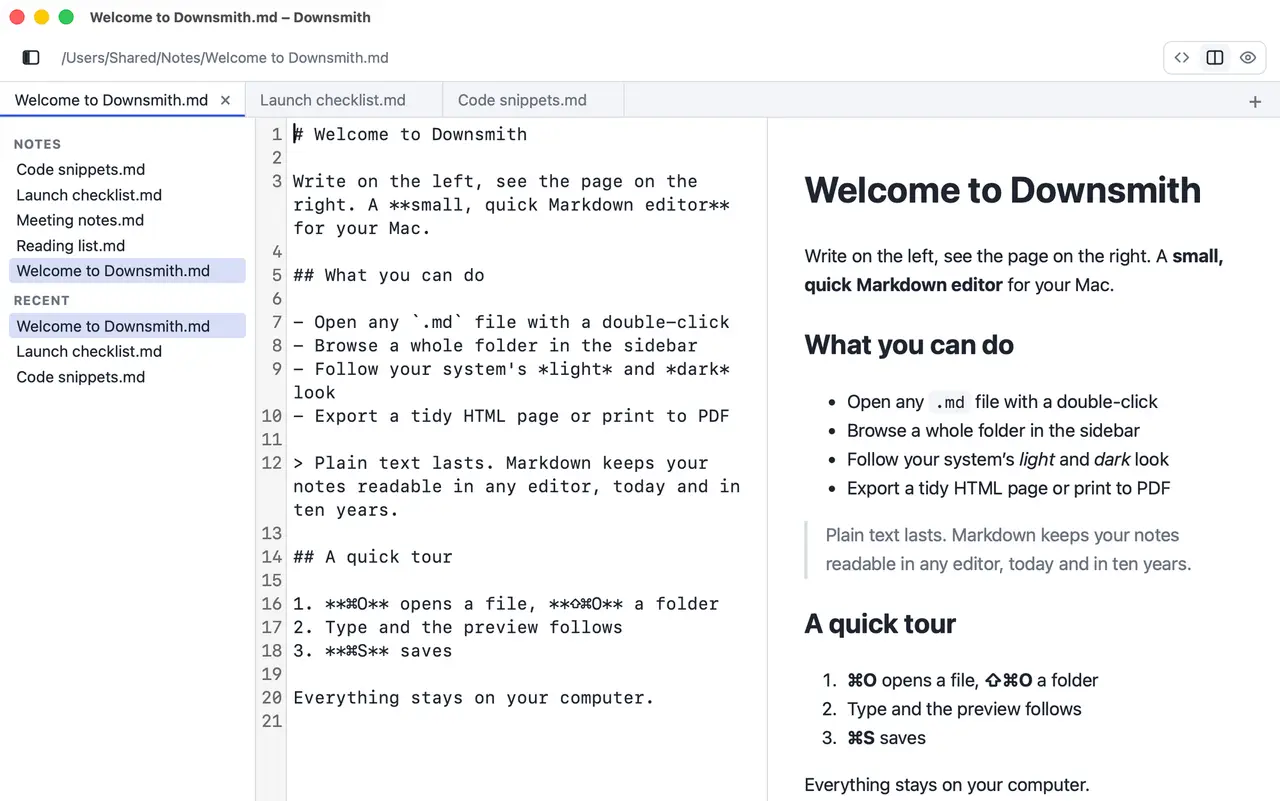
A Markdown editor and viewer that stays out of your way
Downsmith is a free Markdown editor and viewer for macOS and Linux. Open a .md, .markdown or .mdown file and read it as a finished page, or edit the text and watch the preview follow as you type. It works offline and keeps your documents on your computer.
Read
Open a README, a changelog or your notes and read them as a clean page instead of raw symbols.
Write
Edit the text with the result right next to it. Every tab keeps its own undo history.
Keep
Your files stay plain text files on your computer. There is no account and no cloud, and the app sends nothing anywhere.
Made for people who write in plain text
See it as you type
Source on the left, rendered page on the right. Tables, task lists and code blocks with syntax highlighting.
Source, preview or both
Show only the source, only the preview or both side by side, hide the sidebar and drag the dividers to give any column more room. Downsmith remembers your layout.
Many notes, one window
Open several files in tabs and browse a whole folder in the sidebar. Your tabs come back the next time you start Downsmith.
Menus where you expect them
The real menu bar on macOS and Linux, with the shortcuts you know. In English or German, in light or dark, following your system.
HTML and PDF
Save a self-contained HTML page or print to PDF through the system dialog.
Light on memory
Built with Tauri, so it uses the system web view instead of shipping a browser. The macOS app is about 10 MB.
Download
Free for everyone.
macOS Matches your system
macOS 13 Ventura or later · Apple silicon and Intel
- Direct download (.dmg)
- Mac App StoreComing soon
Questions and answers
Is Downsmith a Markdown editor or a viewer?
Both. Show only the source to write, only the preview to read, or both side by side. Downsmith remembers your choice.
Is Downsmith free?
Yes. Downsmith is free for everyone and will stay that way. If it saves you time, a small donation helps me keep building it.
Which systems does it run on?
macOS 13 Ventura or later (Apple silicon and Intel) and 64-bit Linux. The Linux packages need WebKitGTK 4.1. There is no Windows version.
Does Downsmith send my documents anywhere?
No. The app works offline and sends no data to me or to third parties. Your documents stay on your computer.
Which Markdown features does the preview show?
Headings, lists, quotes, links, tables, task lists and fenced code blocks with syntax highlighting. For safety, raw HTML inside a document is not rendered.
Can I export my Markdown to HTML or PDF?
Yes. Save a self-contained HTML page, or print the preview to PDF through the system print dialog.
Can I work on several files at once?
Yes. Every file opens in its own tab, and your tabs come back the next time you start Downsmith. The sidebar lists recent files and lets you browse a whole folder.
Keep the forge lit
Downsmith is free and always will be. If it saves you time, a small donation helps me keep building it.
Support Downsmith